Species and care guides
505 built-in species across 182 genera, with working traits that describe how each genus responds to bonsai techniques, and a care guide per genus that holds your own notes and can be shared.
The catalogue
Every tree is classified by a species, which links it to its genus's working traits and care guide. Use the catalogue the app ships with as it stands, extend it, or ignore it in favour of your own entries.
- Built-in species
- 505
- Genera covered
- 182
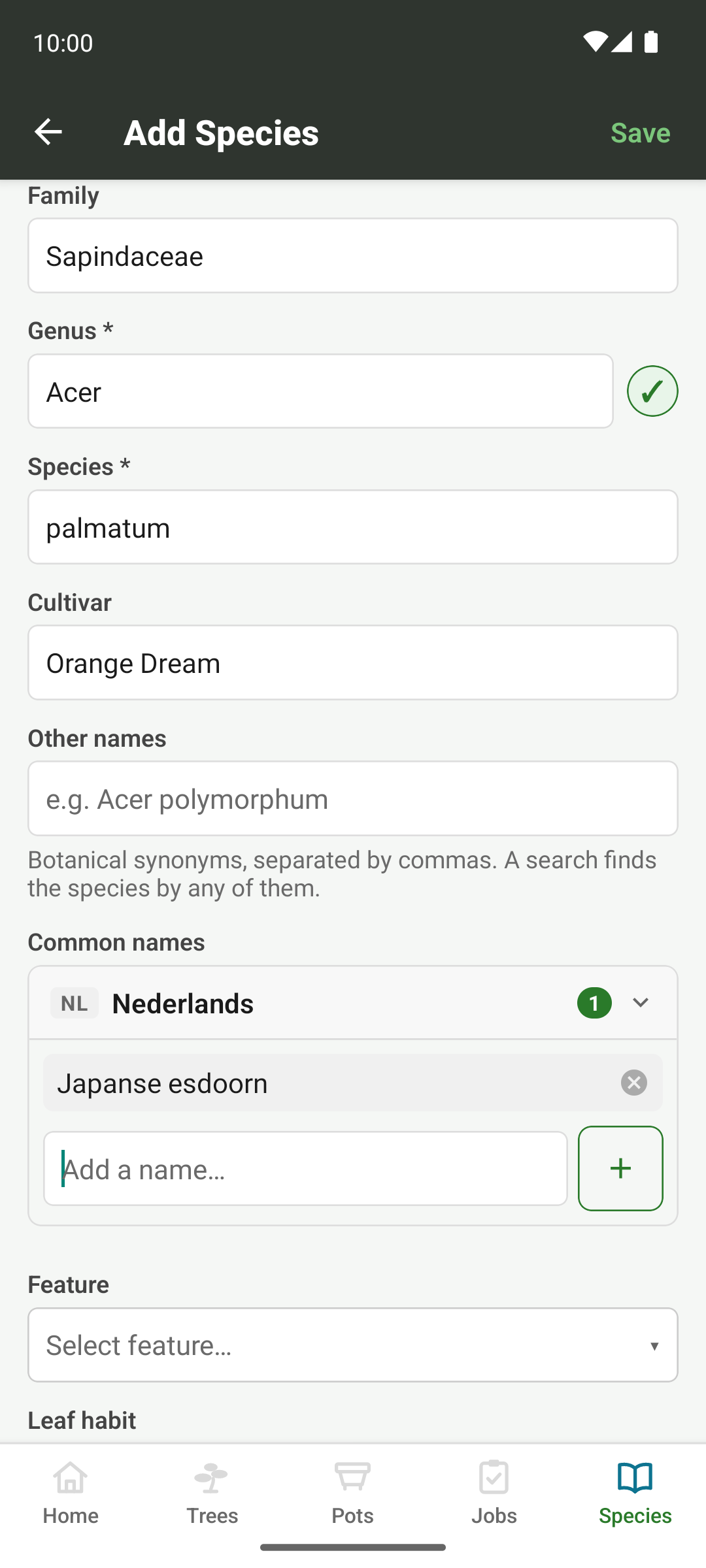
- Each entry records
- Family, genus, species, cultivar, general type, leaf fall, USDA hardiness zone, and whether it's lime-hating
- Common names
- Per language, several per species, and searchable in all 8; a genus or family shows its own common name too, where one is recorded
- Other names
- Botanical synonyms, so an older or trade name finds the species too
- Photos
- Its own gallery, like a tree or a pot
A species gallery doesn't have to be your own trees. Use it as a scrapbook for the species, with shots like a hedgerow hawthorn that shows how it ramifies when nobody's pruned it for fifty years. A caption records where each one came from.
Search reads the common names for your language alongside the botanical name, so typing “Japanese maple”, “Fächerahorn” or Acer palmatum lands you in the same place. It reads the other names too. Botanists rename plants, and nurseries are slow to follow, so Sageretia thea finds the Sageretia theezans you bought, and Rosmarinus officinalis finds rosemary under its current name.
Lime-hating species
Some species won't tolerate lime, chalk or alkaline soil, and the catalogue marks them, from a source that says so rather than from a general liking for acid soil. The species list filters on it. A soil mix can be marked as lime-free, and if you plan or record a repot of a lime-hating tree with a mix that isn't, the app warns you. It never stops you, since you may know something about the mix that it doesn't.
Genus working traits
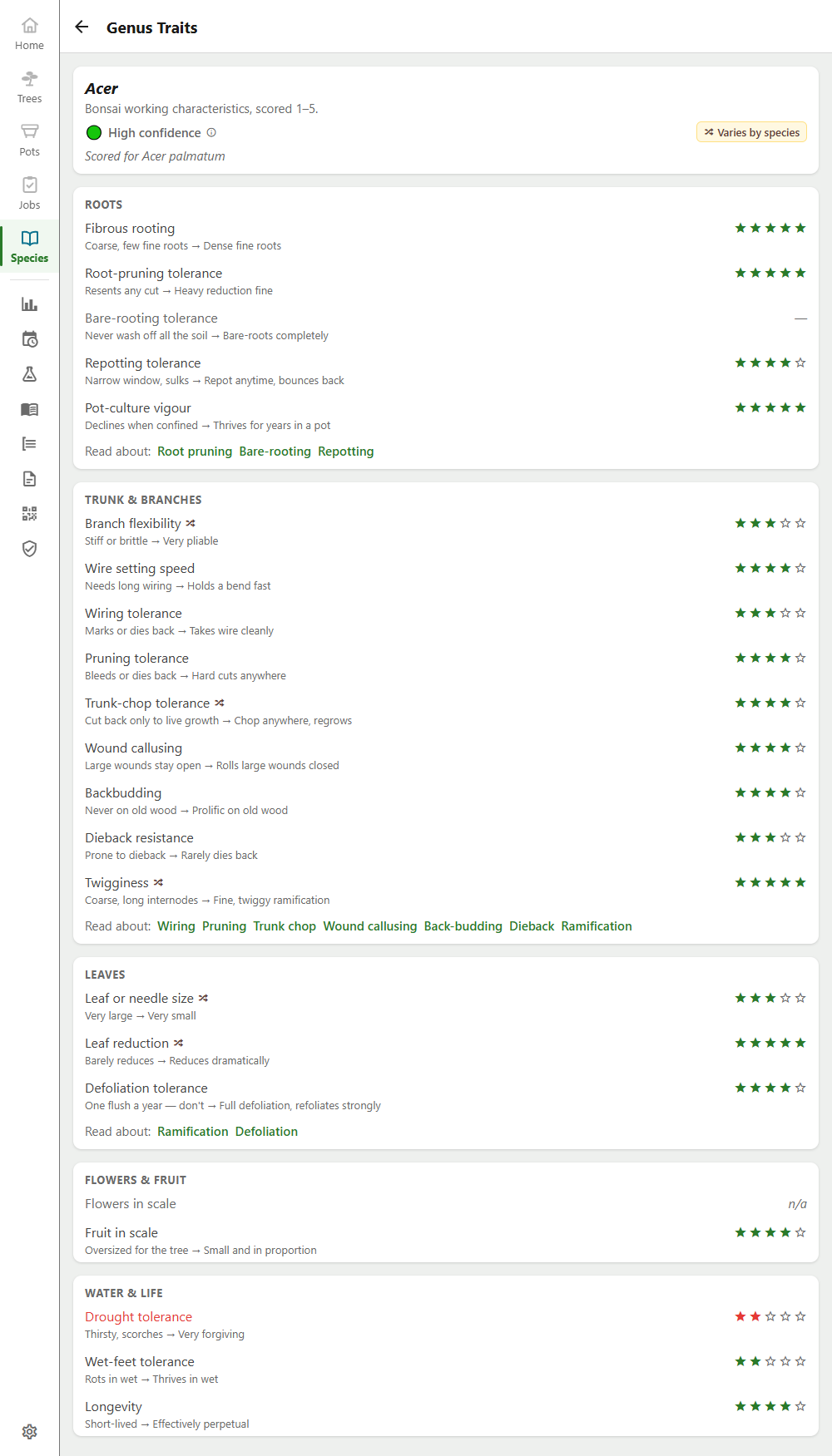
Hardiness tells you whether a tree survives your winter. Before you cut, though, you need to know whether it back-buds, whether it takes a bare-root repot, and whether the wire will set before the bark scars. Inchgrove scores those separately, per genus, on 22 axes in 5 groups.
- Roots
- Fibrous rooting, root-pruning tolerance, bare-root tolerance, repotting tolerance, pot tolerance
- Trunk and branches
- Flexibility, how fast a bend sets, wiring tolerance, pruning tolerance, trunk-chop tolerance, wound callusing, back-budding, dieback resistance, twigginess
- Leaves
- Leaf or needle size, leaf reduction, defoliation tolerance
- Flowers and fruit
- Flower size, fruit size
- Water and life
- Drought tolerance, wet tolerance, longevity
Each axis scores 1–5, and the species page shows the summary, not the whole card: how well documented the genus is, its standout strengths and the things to watch, with a marker where the species under the genus differ. The full 22-axis breakdown has a screen of its own, linked from the genus's care guide.
How well documented a genus is comes from counting the independent bonsai sources its card agrees with. Three or more make it high, two medium, and one or none low. Forum posts and hobbyist videos can suggest a score but never count towards that.
Not every axis gets a number, and the two ways of not having one mean different things. Not applicable means the question doesn't arise, as with defoliating a pine or the flowers on a juniper. Scoring those 1 would read as “tolerates it very badly”. Not established means the question does arise but no source we trust answers it. Care sheets cover watering and feeding thoroughly, and hardly ever say how fast a bend sets or whether a genus buds back on old wood. Filling those gaps with middling guesses would look like data, so the card shows a dash instead.
Every one of the 182 genera has a card. For 5 of them no bonsai source says anything, so garden and botanical sources supply what they can (leaf, flower and fruit size, drought and wet tolerance, longevity), every working-technique axis stays unscored, and the card is labelled “Botanical traits only” so it isn't read as a bonsai assessment. A species you add in a genus the catalogue doesn't have says “Not yet characterised”.
The species list filters on these traits directly. Pick “Wiring tolerance” and a score, or pick “Not established” to see what still needs sourcing, and the list narrows to the ones that match.
Bonsai notes and genus tips
A genus card says what a whole genus does. Some of what matters is narrower than that: a Japanese black pine can be decandled for a second, shorter flush, while a Japanese white pine won't grow again afterwards. So 170 species and cultivars carry a short bonsai note of their own on the species page, and 38 genera carry a tip that holds for every species in them, such as birch bleeding heavily if it's cut before the buds open.
On the species page, below your own trees of that species, one card gathers what the app knows about growing the genus. Under a heading such as “Growing Acer” it has the note, then the tip under its own “whole genus” heading, then the trait summary, and it leads on to the care guide. A tip reaches every species in its genus, including ones you add yourself, and a cultivar you add picks up its species' note. Where there's no note or tip, the card simply leaves it out, since a missing piece of advice doesn't claim anything. Like the traits, both ship with the app, can't be edited, and are translated into all 8 languages.
Care guides
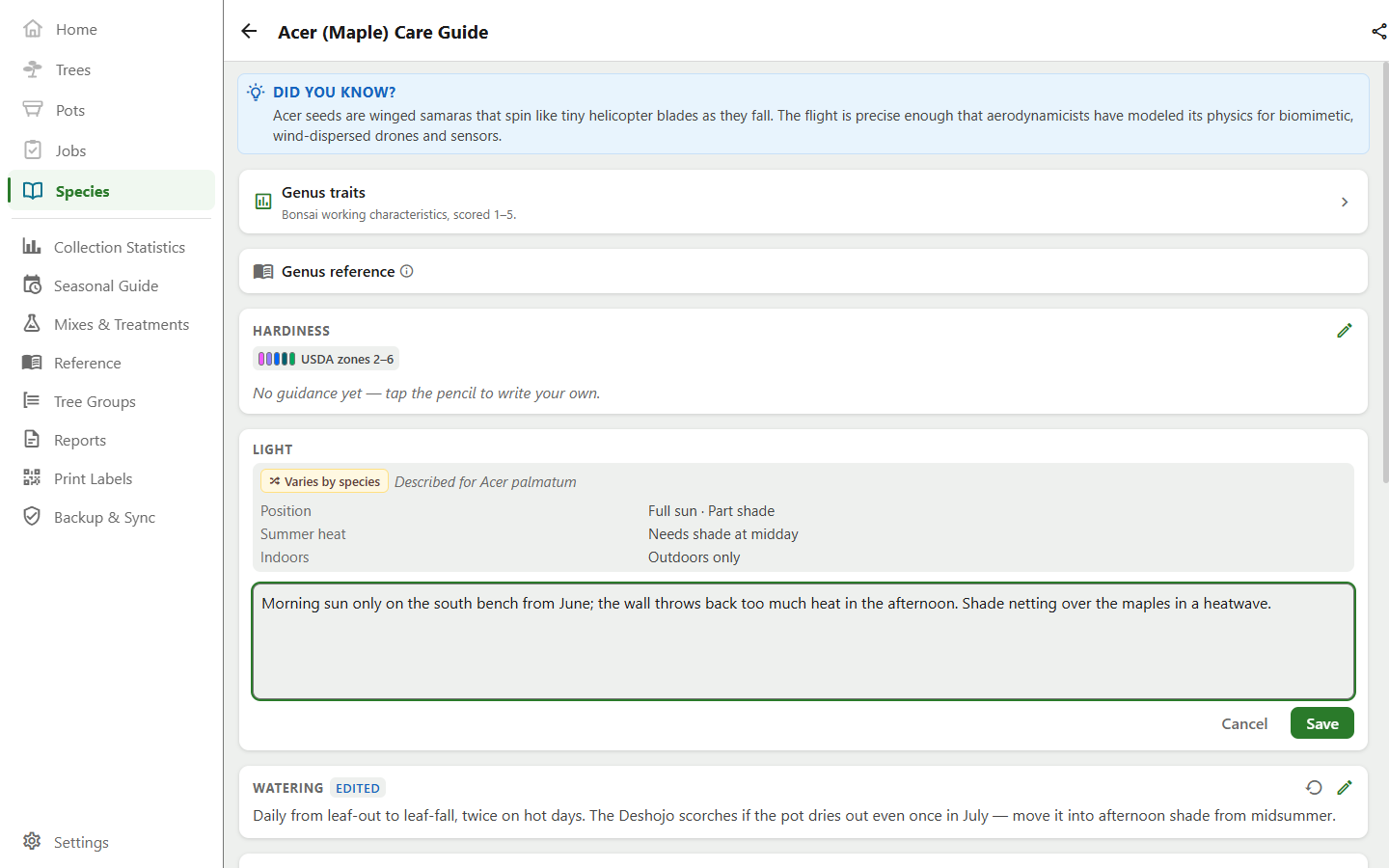
Every genus has a care guide in 8 fixed sections, so two guides are always comparable and you always know where to look for the watering advice.
- Sections
- Hardiness · Light · Watering · Fertilizing · Soil · Pests and diseases · Pruning and styling · Propagation
- Your notes
- Any section, on any genus, written beneath whatever facts the app ships for it
- Resetting
- Per section, clearing your notes there and leaving the shipped facts in place
- Sharing
- Export what you wrote as a pack, with your attribution, for another grower to import
The guide is where your own experience goes. The facts the app ships head the sections they belong to, and your notes sit beneath them, so nothing you write replaces them and nothing shipped later overwrites what you wrote. Edit the same guide from two devices and they converge on one version instead of duplicating it.
Sharing lives on the care guide screen rather than under backup, because a pack is for passing your notes on to someone else. A pack carries only sections you wrote yourself, and the app asks who to credit before it writes the file, since there's no adding that afterwards. On the other end, an imported section is badged with who wrote it, in what language and for what climate.
Facts that hold anywhere
Some of what a guide says depends on where you grow, like when to water, when to feed and when to bring a tree in. Some of it doesn't: whether a genus wants full sun, which pests and diseases it's prone to, whether it wants acidic soil, and how it propagates. For 81 genera, those climate-free facts head the relevant sections of the guide, with your own notes beneath.
- Light
- Full sun, part shade or shade, and whether it wants shade from the midday sun in summer
- Soil
- Whether it needs acidic soil or tolerates lime
- Pests and diseases
- What it's known to be prone to, plus any spray a source says damages it; never a recommended treatment, since what's legal differs by country
- Propagation
- Seed, cuttings, air layering or grafting, and how readily each takes
These follow the same rule as the trait card. Bonsai sources win over garden ones, and the more cautious reading wins when sources disagree. An empty pest list would read as pest-free, so a genus with no named problem says “not established” instead. They ship with the app and aren't editable. What you know from your own bench goes in your notes beneath them.
Above the guide, 115 genera also carry a “Did you know?” with one piece of trivia about the genus, in every language the app speaks. Where a genus has no care facts or trivia, the guide starts straight in.
Reference library
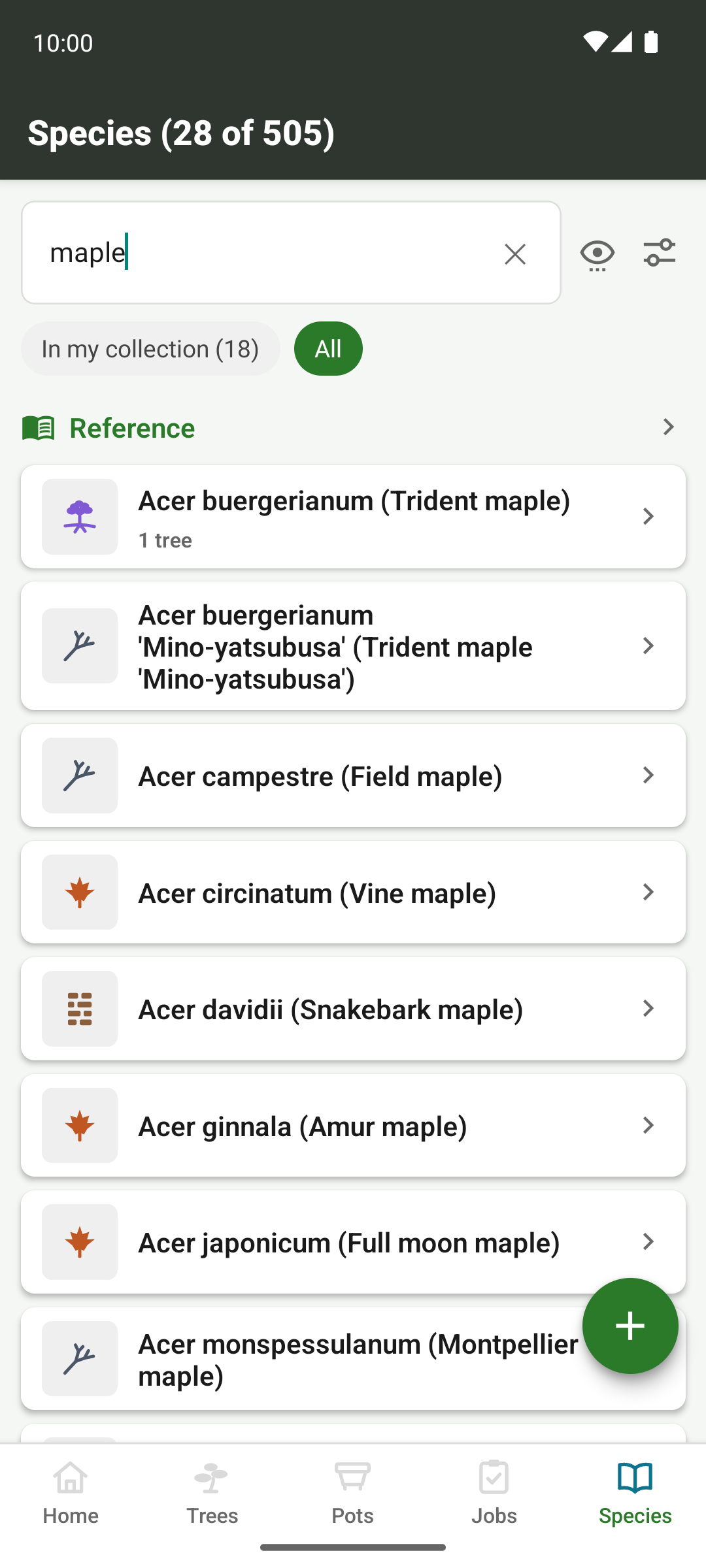
The words the app uses have pages of their own to explain them. On the desktop the library sits in the sidebar; on a phone it heads the species list. Each topic has a tab. Like the notes and tips, the pages ship with the app and are translated into all 8 languages.
- Techniques and terms
- 16 pages, each naming the trait axes it explains, so the traits card links straight to them
- Styles
- All 40 built-in styles, with the Japanese name and the pot each usually takes
- Soil ingredients
- 12, each with its water retention, structure and acidity
- Size classes
- 5, each with its height range
- Pests and diseases
- 33, described for recognition, each listing the genera known to suffer it
The pages are linked from wherever their words appear: a pest named in a care guide, a group on the traits card, a tree's style, and the soil mix form. A pest page never names a treatment, for the same reason the care guide doesn't. Instead it points you to the pest treatments you've recorded yourself.
Hazards
Some species are poisonous to people or pets. Where a hazard is known, the species page says what kind it is (ingestion, skin contact, or a risk specific to pets), how serious it is, and which part of the plant carries it. The part is recorded per hazard, because one plant can harm in two ways. Virginia creeper, for example, irritates through its sap and poisons through its berries.
The catalogue records known hazards only, and will never cover every species, so one with no entry reads as “no hazard recorded”, never as “safe”.
Adding your own
A species you add behaves exactly like a built-in one. It shows up in the pickers and the search, takes its own photos and custom fields, gets counted in the statistics, and travels in your exports and your sync.
- You provide
- Family, genus, species and cultivar, as much as you know
- Common names
- As many as you like, in any of the languages the app speaks
- Other names
- Any botanical synonyms, so a search finds it under those too
- Classification
- General type and leaf fall, which drive the icons and the gallery filters, and whether it's lime-hating
- Hardiness
- A USDA zone, which feeds the winter reading and the frost warnings on every tree of that species
- Genus knowledge
- A new species in a genus the app already knows inherits that genus's traits, tip and care guide immediately, and a new cultivar inherits its species' note